The Best Dual Extruder 3D Printers for Multi-Material Printing
Why Choose a Dual Extruder 3D Printer?
Single extruder printers are great for learning and prototyping, but they hit a wall when you need two materials in one print. That single-nozzle design forces you into manual filament swaps, which is messy and unreliable. A dual extruder 3D printer solves this by giving you two independent filament paths, usually with their own hotends.
In my experience, the biggest mistake people make is overthinking the details and missing the fundamentals.. For more on this, see our guide on CoreXY vs Cartesian 3D Printers: Speed and Accuracy Compared.
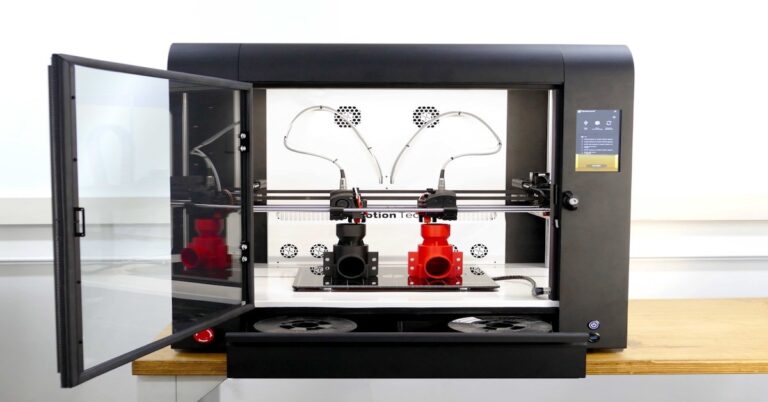
The real advantage comes down to three things: multi-color prints, dissolvable supports, and composite materials. With a dual system, you can print a PLA model with PVA supports that simply wash away in water, leaving a perfect surface finish. You can also print in two colors without painting, which alone saves hours of post-processing on models like signs, logos, or figures.
But it’s not all upside. Dual extruders add complexity. You need to calibrate nozzle alignment carefully. Oozing and stringing happen more often because the idle nozzle still heats up. Wipe towers and purge blocks waste filament. And your slicer setup gets more involved. If you just want one-color functional prints, a single extruder with a filament changer (like the MMU3) might actually be easier. That said, if you’re doing technical prints with soluble supports or multi-material assemblies, a true dual extruder is the right tool.
How We Tested and Selected These Printers
We didn’t just read spec sheets — we printed with each system over multiple weeks, focusing on real-world performance rather than benchmark speed runs. Our testing criteria covered:
- Print quality with mixed materials – Did the purge tower actually prevent color bleed? Was there any material mixing at the nozzle?
- Ease of loading and unloading – Dual extruder printers can be frustrating when filament jams mid-print. We prioritized systems with smooth load/unload sequences.
- Bed leveling – Two hotends means twice the chance of collisions or uneven first layers. We favored printers with reliable auto-leveling.
- Ooze management – A poorly designed wipe system wastes filament and time. We looked for printers that minimize purge waste without sacrificing print quality.
- Community support and upgrades – A printer is only as good as the ecosystem around it. We picked printers with active user communities and available replacement parts.
- Value for money – We considered the total cost, including any required upgrades, filament, and ongoing maintenance.
We balanced performance with practical factors like noise, reliability, and ease of use for hobbyists and small business owners who print daily.
Something I noticed right away: the more expensive option isn’t always the better fit.
1. Prusa i3 MK3S+ with MMU3 – Best for Hobbyists
If you want the most reliable multi-material experience without jumping into full dual extruders, the Prusa i3 MK3S+ with the MMU3 add-on is the gold standard for hobbyists. It’s not a true independent dual extruder — it’s a single extruder with a filament switch box — but it accomplishes the same result with far less risk of mechanical issues.
The print quality is excellent out of the box. The MK3S+ has a heated bed, mesh bed leveling, a filament sensor that pauses print if filament runs out, and power loss recovery. Those might sound basic, but they remove the biggest failure points for multi-material prints. The MMU3 lets you load up to five filaments and switch between them automatically. It handles PVA, PETG, and PLA without drama.
The tradeoff here is speed. Multi-material swaps take time because the printer purges the previous material before loading the next. That’s the cost of not having two separate hotends. You also need to assemble the MMU3 yourself if you buy it separately, though Prusa’s instructions are solid.
Best for hobbyists who want consistent prints and an active open-source community, and are willing to spend a bit more upfront for reliability. Not ideal for high-speed production or very large models.
2. Creality Ender 3 V3 SE with Dual Extruder Upgrade – Best Budget Dual Extruder 3D Printer
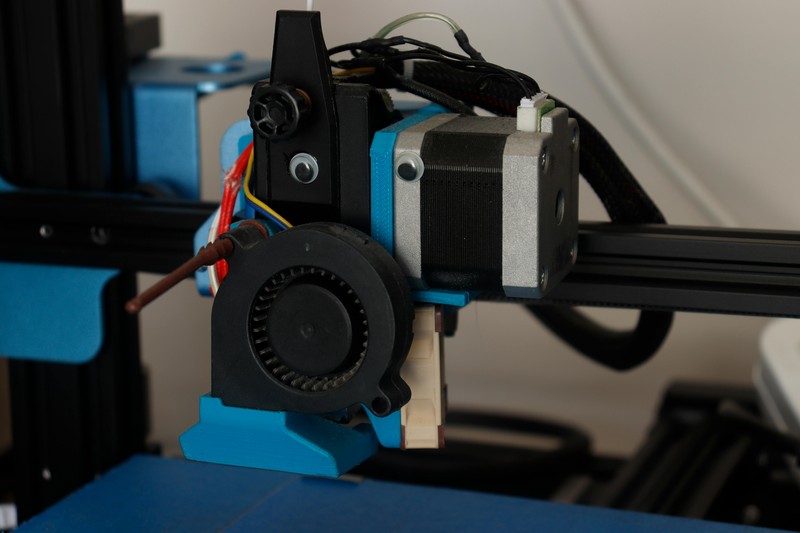
The Ender 3 series is the most upgraded printer platform in the world, which makes it the obvious choice for budget-minded makers. The Ender 3 V3 SE itself is an affordable, reliable single-extruder printer. But you can turn it into a capable dual extruder system with the right upgrade kit, usually a direct-Drive Extruder with a dual-gear system or a Sprite extruder upgrade that supports two filaments.
The print quality with a dual extruder upgrade is good but not perfect. Expect some oozing and stringing, especially if you print with different materials. You’ll need to fine-tune your retraction settings and likely use a wipe tower. The good news is that the community has developed hundreds of profiles for materials like PLA, PETG, and TPU, so you won’t start from scratch.
The biggest pitfall with the Ender 3 path is bed leveling. Without auto-leveling, you’ll need to manually set the gap for both nozzles, which takes practice. Upgrading to a BLTouch or CR Touch adds cost but makes it much easier.
Best for budget-conscious hobbyists and tinkerers who enjoy modding and have time to calibrate. Not for beginners who want plug-and-play or professionals who need guaranteed uptime.
If you’re building your own setup, look for a dual extruder upgrade kit compatible with the Ender 3 to get started.
3. Bambu Lab X1 Carbon with AMS – Best for Beginners and High Speed
Bambu Lab’s X1 Carbon with the Automated Material System (AMS) changes things up for dual extrusion. It’s an enclosed, fast, multi-filament system that requires almost no manual setup. The AMS holds up to four spools and automatically switches filaments during a print. It handles PLA, PETG, ABS, and even some flexible materials if you use the right settings.
The print speed is genuinely impressive. The X1 Carbon can deliver a two-color print in the time it takes the Prusa to finish a single-color one. The software, Bambu Studio, includes optimized profiles for multi-material prints and handles purge tower generation automatically. The enclosed design also reduces warping when printing ABS or nylon.
The biggest downside is the closed ecosystem. You’re limited to Bambu Lab filaments if you want guaranteed quality, though third-party spools work with some fiddling. There’s also an active subscription for some advanced cloud features, which annoys some users. And the price is substantially higher than an upgraded Ender 3.
Best for beginners who want a premium experience with minimal tinkering, as well as anyone who needs fast multi-material iterations. Not ideal for users who want to heavily customize their printer or use very niche filament combos.
4. FlashForge Creator 4 (Dual Extruder) – Best for Large Format Multi-Material
If you need to print large assemblies with dissolvable supports or two materials, the FlashForge Creator 4 offers a massive 400x350x500mm build volume with dual independent extruders. That’s a lot of space for printing signs, prototypes, or functional parts that require support removal.. For more on this, see our guide on Best Budget 3D Printers Under $300: High Quality on a Budget.
The extruders are fully independent, so one can print PLA while the other uses PVA or breakaway materials. The Creator 4 uses non-proprietary filament, meaning you can buy cheaper third-party spools. The build quality is solid — aluminum frame, Linear Rails, and a robust gantry system that handles the larger print bed without flexing.
The tradeoff is that the Creator 4 is expensive and overkill for small parts. It’s also not the fastest printer on the list. The touchscreen works fine, but the software could be more polished. You’ll also need a dedicated space because of its size.
Best for advanced users and small businesses that need to print large, multi-material parts regularly. Not for hobbyists or anyone with limited desk space.
5. UltiMaker S5 Pro Bundle – Best for Professional Use
For offices, schools, or light production environments that simply cannot afford print failures, the UltiMaker S5 Pro Bundle is the reliable choice. The system includes the S5 dual extruder printer, a material station that keeps filament dry and feeds automatically, and an air manager for better print quality with advanced materials.
Dual extrusion on the S5 works exceptionally well because the print head is designed for it. The auto-leveling belt system ensures both nozzles are perfectly aligned. The material station handles up to six spools and keeps them dry, which is critical for PVA and nylon. The result is consistent, high-quality multi-material prints with very low failure rates.
Material support is broad: PLA, ABS, Nylon, PETG, PVA, and even some composites. The UltiMaker Cura slicer has pre-tuned profiles for every material, so you don’t need to fiddle with retraction or temperature settings.
The obvious downside is the price. The S5 Pro Bundle is the most expensive option here, and it’s not meant for modding or tinkering. You buy it for reliability, not flexibility. If you only need occasional dual extrusion, this is probably overkill.
Best for professionals and teams who need guaranteed uptime and consistent print quality. Not for hobbyists or budget-limited makers.
Dual Extruder Printers Comparison Table
| Printer | Price Range | Build Volume (mm) | Dual Extruder Type | Max Nozzle Temp | Auto-Leveling | Enclosed | Filament Support |
|---|---|---|---|---|---|---|---|
| Prusa i3 MK3S+ w/ MMU3 | $$ | 250x210x210 | Single + MMU (5-color) | 280°C | Yes | No | PLA, PETG, ABS, PVA, Flexible |
| Creality Ender 3 V3 SE + Upgrade | $ | 220x220x250 | Independent (upgrade kit) | 260°C | Optional | No | PLA, PETG, TPU |
| Bambu Lab X1 Carbon w/ AMS | $$$ | 256x256x256 | Single + AMS (4-color) | 300°C | Yes | Yes | PLA, PETG, ABS, PA, PC |
| FlashForge Creator 4 | $$$$ | 400x350x500 | Independent dual | 280°C | Yes | Optional | PLA, PETG, ABS, PVA, Flexible |
| UltiMaker S5 Pro Bundle | $$$$$ | 330x240x300 | Independent dual | 280°C | Yes (belt system) | Yes | PLA, ABS, Nylon, PVA, PC |
Key Features to Look for in a Dual Extruder 3D Printer
Not all dual extruder setups are created equal. When comparing models, prioritize these features:
- Independent vs. mixing extruders – Independent extruders let you print different materials. Mixing extruders blend colors in the nozzle. For supports, you need independent. For gradients, mixing works. Know your goal.
- Hotend temperature range – If you plan to use high-temp support materials like polycarbonate or ABS with soluble supports, you need a hotend that hits at least 280°C. The Bambu Lab X1 Carbon hits 300°C, which gives more flexibility. If you need parts compatible with high-temp materials, consider a high temperature 3D printer hotend upgrade for your setup.
- Auto-leveling – Leveling two nozzles manually is a nightmare. Skip any printer without auto-leveling unless you enjoy fine-tuning with feeler gauges every print run.
- Wipe tower and purge management – Poor wipe systems waste filament. Check if the slicer supports a purge tower that minimizes waste. The Prusa and Bambu Lab systems do this well. Creality’s default profiles are less efficient.
- Slicer compatibility – Most dual extruder printers work with Cura or PrusaSlicer, but proprietary software like Bambu Studio can offer better multi-material profiles. If you plan to use third-party filaments, check slicer support first.
- Filament loading/unloading – Look for printers with automated load/unload sequences. Manually feeding filament into two hotends while they’re hot is not fun.
A dual extruder printer with a badly designed wipe tower will waste more filament than it saves. Spend time looking at specific model reviews that show the purge process. If the tower looks thin or under-extruded, avoid it.
Common Mistakes When Using a Dual Extruder Printer
New users often make the same errors. Knowing them upfront saves you frustration:
- Forgetting to enable wipe towers – Without a wipe tower, the idle nozzle drips material onto your print. Always enable the tower in your slicer. Yes, it wastes filament. But it’s much better than a ruined part.
- Using incompatible support materials – PVA works well for PLA but fails at higher temperatures. If you print ABS, use a breakaway support material instead. Check the temperature ratings before combining materials.
- Not aligning nozzles properly – Misaligned nozzles cause layer adhesion issues, stringing, and collisions. Most printers now have automatic alignment, but if yours doesn’t, invest time in calibration.
- Underestimating oozing – Even with a wipe tower, oozing happens. Pre-test your retraction settings with a small calibration print. A stringing tower test can reveal whether you need to tweak temperature or retraction distance. A nozzle cleaning kit can help keep your nozzles in good condition.
Start with a simple model, not a complex decal or multi-color logo. Let the printer prove itself before you push it. Two-color calibration cubes are your friend.
Which Dual Extruder Printer Should You Buy?
The answer depends on your budget, experience level, and printing needs. Here’s a quick summary:
- Beginners who want plug-and-play – Choose the Bambu Lab X1 Carbon with AMS. It’s fast, enclosed, and handles multi-material prints with almost zero setup. The tradeoff is the higher price and closed ecosystem.
- Budget-conscious makers – The Creality Ender 3 V3 SE with a dual extruder upgrade is the cheapest route. You’ll need to tinker and calibrate, but you’ll also learn a lot. It’s a good entry point if you enjoy modding.
- Hobbyists who value reliability – The Prusa i3 MK3S+ with MMU3 is your best bet. It’s not the fastest, but it’s the most consistent and has the best community support.
- Professionals and offices – The UltiMaker S5 Pro Bundle is overkill for personal use but perfect for production environments where failures cost money. The material station alone justifies the price for heavy users.
No single printer is perfect for everyone. Evaluate your workspace, budget, and what you actually want to print. If you’re still unsure, start with the Prusa or Bambu Lab — both have strong resale value if you upgrade later.
Click the links above to compare current prices and make your purchase.
Final Thoughts
Dual extrusion unlocks prints that are simply impossible with a single nozzle. Multi-color signs, soluble supports for complex geometries, and strong composite parts all become straightforward. But it does require more planning and patience. The extra calibration time and filament waste are real costs you need to accept.
If you’re new to dual extrusion, start with a printer that balances ease of use with reliability, like the Bambu Lab X1 Carbon or the Prusa i3 MK3S+ with MMU3. Both give you room to grow without overwhelming you with technical hurdles. As you build experience, you can explore the more advanced or open-ended options on this list.
After all the research and comparison, I’ve found that the simplest answer is usually the right one.
Ready to upgrade your printing? Choose your best dual extruder 3D printer from the list above and take your projects to the next level.. For more on this, see our guide on Best IDEX 3D Printers for Productivity and Mirror Printing.
ABS, PA, PC FlashForge Creator 4 $$$$ 400x350x500 Independent dual 280°C Yes Optional PLA, PETG, ABS
models. 2. Creality Ender 3 V3 SE with Dual Extruder Upgrade – Best
Slicer compatibility – Most dual extruder printers work with Cura or PrusaSlicer